.md and .mdx both support headings, paragraphs, lists, links, quotes, images and tables. Use native Markdown for these. The Typography group includes a Markdown example that needs no imports.
For a little more structure
.mdx supports the named components below in regular pages, case studies and blogs. Copy the complete snippet, keep its imports below your frontmatter, then edit the words. .md files do not run these components.
Keep the content readable
Keep blank lines around Markdown inside components. Choose headings that fit the page. Do not add inline styles or classes to editorial content.
Browse the library
Components
40 examples
Preview width
Reading previews are capped at 640px; wide previews use the available space. Both adapt to your screen.
No matching examples.
Try a different word or show all purposes.
01
Typography
Markdown
Headings, paragraphs, lists and links in the website’s typography.
Markdown
Start with a shared question
What would make work clearer for the people doing it?
Begin with what you can observe. Leave room for different perspectives, then choose a useful next step.
Written in Markdown with no imports. The preview shows the site’s text styles; use it in .md or .mdx.
View Markdown
## Start with a shared question

What would make work **clearer** for the people doing it?

Begin with what you can observe. Leave room for *different perspectives*, then choose a useful next step.

- Listen to the people closest to the work.
- Make the current situation visible.
- Try one change and reflect on what happens.

### Keep the conversation moving

1. Agree what you want to understand.
2. Choose a small experiment.
3. Decide when to review it.

[Explore how we work](/services/).
Surface
The same Markdown elements on a coloured surface.
MDX
A little space for the words
The surface groups related writing while the content stays in Markdown.
Use when related text needs a shared surface. Choose paper, purple-hour or flow. Headings, paragraphs, lists and links stay in Markdown; prose without a surface needs no component.
View MDX and imports
import Prose from '@components/content/Prose.astro';

<Prose surface="paper">

### A little space for the words

The surface groups related writing while the content stays in **Markdown**.

- Use headings to show the structure.
- Keep links descriptive.
- Give each paragraph a clear purpose.

[Explore our services](/services/).

</Prose>
02
Introduction and columns
An introduction followed by two columns of content.
MDX
Page layout
A heading and introduction
Use a heading and a short paragraph to introduce this part of the page. Keep the main point clear before adding more detail.
First column
Place one related idea in each column.
Second column
On smaller screens, the columns stack in the same reading order.
LeadText provides the introductory label; Columns and Column arrange the content below it. The example uses the surrounding page’s spacing. Compact columns stack when the available width is narrow.
View MDX and imports
import Columns from '@components/columns/columns.astro';
import Column from '@components/column/column.astro';
import LeadText from '@components/lead-text/lead-text.astro';

<LeadText>Page layout</LeadText>

### A heading and introduction

Use a heading and a short paragraph to introduce this part of the page. Keep the **main point** clear before adding more detail.

<Columns compact>

<Column>

#### First column

Place one related idea in each column.

</Column>

<Column>

#### Second column

On smaller screens, the columns stack in the same reading order.

</Column>

</Columns>
03
Section
Give a related idea its own space.
MDX
A moment to reflect.
Look at the trail so far. What have you learned, and what would help you choose the next step?
Keep what is helping.
Explore what needs to change.
Choose paper, purple-hour or flow. Match titleLevel to the surrounding headings; use display only for a prominent section title.
View MDX and imports
import Section from '@components/content/Section.astro';

<Section title="A moment to reflect." titleLevel={3} surface="purple-hour" display>

Look at the trail so far. What have you learned, and what would help you choose the next step?

- Keep what is helping.
- Explore what needs to change.

</Section>
04
Columns
Compare two ideas without making readers jump around.
MDX
What we see
Work waits between teams. The handovers are difficult to see.
What we could try
Map one piece of work together, from the first request to the final outcome.
Use compact for content that must stack within a narrow column. Keep the reading order meaningful when the columns stack.
View MDX and imports
import Columns from '@components/columns/columns.astro';
import Column from '@components/column/column.astro';
import Section from '@components/content/Section.astro';

<Columns compact>
  <Column>
    <Section title="What we see" titleLevel={3}>

Work waits between teams. The handovers are difficult to see.

    </Section>
  </Column>
  <Column>
    <Section title="What we could try" titleLevel={3}>

Map one piece of work together, from the first request to the final outcome.

    </Section>
  </Column>
</Columns>
05
Cards
Group a small set of related next steps.
MDX
Understand the work
Find out how we help teams see their options more clearly.
Keep each card focused. Use a descriptive Markdown link inside the card, rather than nesting links inside a clickable card.
View MDX and imports
import Columns from '@components/columns/columns.astro';
import Column from '@components/column/column.astro';
import Card from '@components/card/card.astro';

<Columns compact>
  <Column>
    <Card surface="paper">

### Understand the work

Find out how we help teams see their options more clearly.

[Explore our services](/services/)

    </Card>
  </Column>
  <Column>
    <Card surface="flow">

### Start a conversation

Bring a question about your team, your work or what comes next.

[Talk to Gemba](/contact/)

    </Card>
  </Column>
</Columns>
06
Callout
Highlight a useful note without interrupting the flow.
MDX
Use sparingly for context readers need. This is an editorial note, not a live error or urgent alert.
View MDX and imports
import Callout from '@components/content/Callout.astro';

<Callout title="Leave room for different views" titleLevel={3}>

A shared conversation does not require everyone to have the same experience. Record **what differs** as well as what the team agrees on.

</Callout>
07
Quote
Markdown
A blockquote written entirely in Markdown.
Markdown
Make space to understand the work before deciding what to change.
An illustrative reflection, written as a native Markdown blockquote.
Works in .md and .mdx. This is an illustrative reflection. Use the attributed Quote component when the source needs structured credit.
View Markdown
> Make space to understand the work before deciding what to change.

An illustrative reflection, written as a native Markdown blockquote.
Attributed
A quotation with a clear attribution.
MDX
We can see where work waits. Our next step is to understand why.
Illustrative workshop reflection
Use the Markdown variant when no attribution structure is needed. Verify permission and the exact words before adding a real quote.
View MDX and imports
import Quote from '@components/content/Quote.astro';

<Quote attribution="Illustrative workshop reflection">

We can see where work waits. Our next step is to understand why.

</Quote>
08
Table
Markdown
A small table written entirely in Markdown.
Markdown
Focus
Next step
Listen
Invite different views
Learn
Try one small change
Reflect
Review what happened
Works in .md and .mdx with no imports. Use the Scrollable variant for wider tables in MDX.
View Markdown
| Focus | Next step |
| --- | --- |
| Listen | Invite different views |
| Learn | Try one small change |
| Reflect | Review what happened |
Scrollable
A Markdown table with a label and room to scroll.
MDX
An example experiment plan
Question
Small experiment
Review
Where does work wait?
Map one request together
After the next delivery
Are priorities clear?
Agree a single ordered list
At the next team check-in
What helps us learn?
Record one observation each day
At the next reflection
The table itself remains Markdown. The wrapper adds a labelled, keyboard-focusable scroll area on narrow screens. Keep cells concise.
View MDX and imports
import Table from '@components/content/Table.astro';

<Table caption="An example experiment plan">

| Question | Small experiment | Review |
| --- | --- | --- |
| Where does work wait? | Map one request together | After the next delivery |
| Are priorities clear? | Agree a single ordered list | At the next team check-in |
| What helps us learn? | Record one observation each day | At the next reflection |

</Table>
09
Figure
Caption
An image with a caption that adds context.
MDX
A little perspective can help us choose the next step.
Use ordinary Markdown for an image without a caption. Supply meaningful alt text and the image’s actual width and height.
View MDX and imports
import Figure from '@components/content/Figure.astro';

<Figure
  src="/images/background-home.avif"
  alt="Rocky mountain landscape with a glowing trail beneath an open sky"
  width={3840}
  height={1918}
  caption="A little perspective can help us choose the next step."
/>
Full-size link
Keep a diagram readable in the page, with a link to its full-size image.
MDX
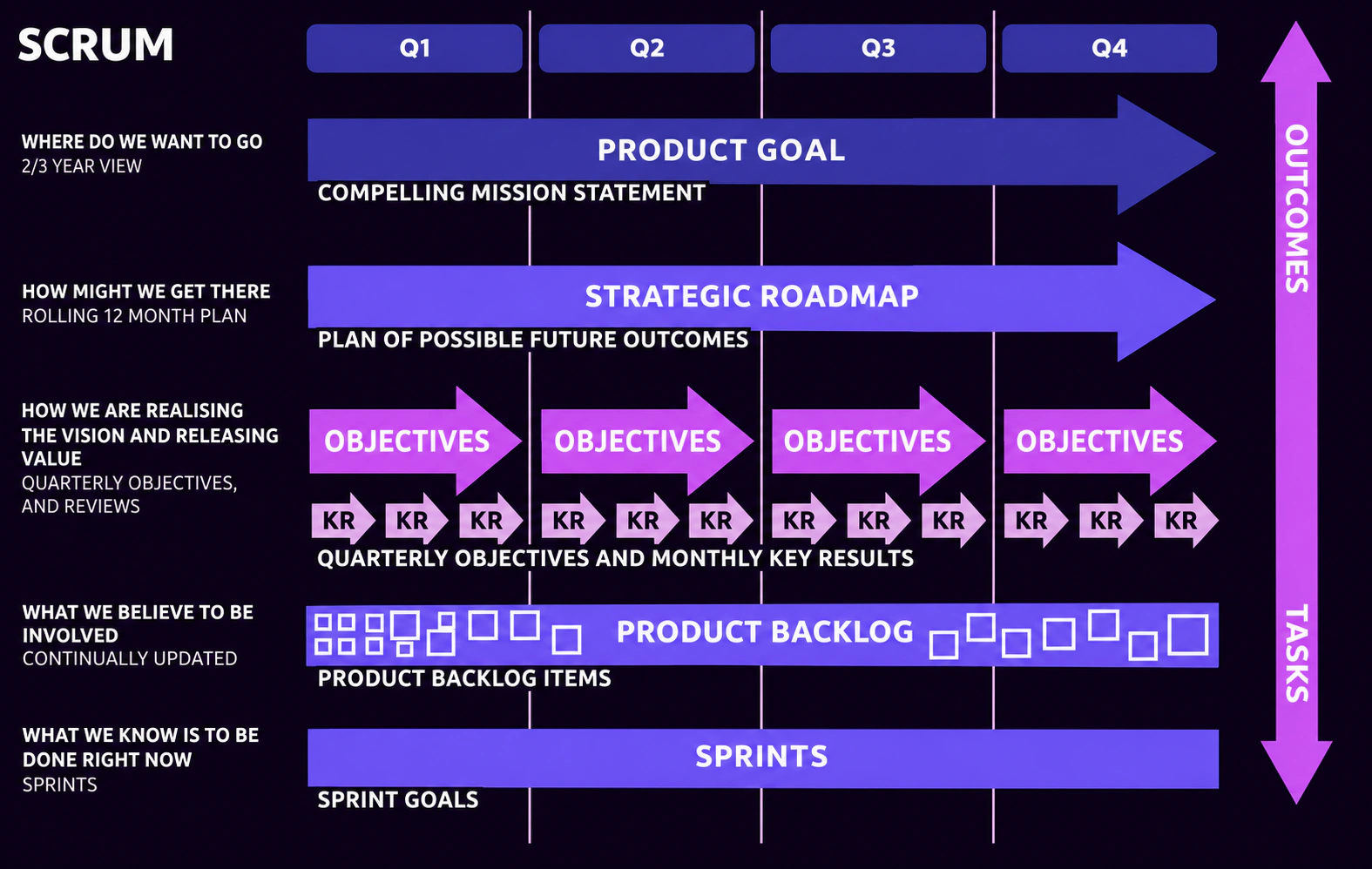
From strategy to delivery: connect the product goal to the work of each sprint. View full size
Set fullSizeSrc on Figure to add View full size. This is an ordinary link in the same tab; use Back to return. Keep a useful caption, alternative text and the actual image dimensions.
View MDX and imports
import Figure from '@components/content/Figure.astro';

<Figure
  src="/images/blog/get-started-with-okrs/strategy-to-delivery.webp"
  fullSizeSrc="/images/blog/get-started-with-okrs/strategy-to-delivery.webp"
  alt="Diagram connecting a long-term product goal and strategic roadmap to quarterly objectives, key results, a product backlog and sprint goals."
  width={1575}
  height={998}
  caption="From strategy to delivery: connect the product goal to the work of each sprint."
/>
10
Statistics
Default
Large numbers with labels, in a layout that adapts to its container.
MDX
An illustrative workshop plan.
1shared question
2perspectives to explore
3possible experiments
4weeks until reflection
Omit surface for this appearance. The Surface variant below adds a framed background. These numbers illustrate a workshop plan.
Names, roles and profile images in a responsive grid.
MDX
These illustrative roles use the same sample image.
Example facilitatorHelps the conversation move forward
Example team memberBrings experience of the work
Example sponsorHelps remove barriers
These are example roles using the existing sample image. Replace the names, roles and images with your team’s details. Images are optional; profiles wrap to fit the available width.
View MDX and imports
import Team from '@components/team/team.astro';

These **illustrative roles** use the same sample image.

<Team members={[
  { name: 'Example facilitator', role: 'Helps the conversation move forward', image: '/images/image-test.avif' },
  { name: 'Example team member', role: 'Brings experience of the work', image: '/images/image-test.avif' },
  { name: 'Example sponsor', role: 'Helps remove barriers', image: '/images/image-test.avif' },
]} />
12
FAQ
An expandable question-and-answer list with text answers.
MDX
Where could we start?
Choose one question about the work and invite the people closest to it.
What should we bring?
Bring a recent example, the questions it raises and room for different perspectives.
What happens afterwards?
Agree one small experiment and a time to review what you learn.
FAQ accepts text question and answer strings. Use Disclosure below when an answer needs Markdown lists, emphasis or links. Both work without JavaScript.
View MDX and imports
import FAQ from '@components/faq/faq.astro';

<FAQ items={[
  { question: 'Where could we start?', answer: 'Choose one question about the work and invite the people closest to it.' },
  { question: 'What should we bring?', answer: 'Bring a recent example, the questions it raises and room for different perspectives.' },
  { question: 'What happens afterwards?', answer: 'Agree one small experiment and a time to review what you learn.' },
]} />
13
Disclosure
Keep an optional answer close to the question.
MDX
What should we bring to the conversation?
Bring a real example of work you want to understand.
A question the team keeps coming back to.
An example of a handover or delay.
A change you would like to try.
Get in touch if you would like help choosing a starting point.
Use for supporting detail, never the only copy of essential information. The native control works with keyboard and without JavaScript.
View MDX and imports
import Disclosure from '@components/content/Disclosure.astro';

<Disclosure title="What should we bring to the conversation?">

Bring a real example of work you want to understand.

- A question the team keeps coming back to.
- An example of a handover or delay.
- A change you would like to try.

[Get in touch](/contact/) if you would like help choosing a starting point.

</Disclosure>
14
Steps
Explain a short sequence with room for context.
MDX
Look together
Choose one part of the work and listen to the people closest to it.
Try something small
Make one change that helps you learn, with a clear question in mind.
Pause and reflect
Review what happened. Decide what to keep, adapt or stop.
Prefer a normal numbered Markdown list for simple instructions. Use this when each step needs its own heading and paragraph.
View MDX and imports
import Steps from '@components/content/Steps.astro';
import Step from '@components/content/Step.astro';

<Steps label="A small learning cycle">
  <Step title="Look together" titleLevel={3}>

Choose one part of the work and listen to the people closest to it.

  </Step>
  <Step title="Try something small" titleLevel={3}>

Make one change that helps you learn, with a clear question in mind.

  </Step>
  <Step title="Pause and reflect" titleLevel={3}>

Review what happened. Decide what to keep, adapt or stop.

  </Step>
</Steps>
15
Call to action
Give readers one clear place to go next.
MDX
Where could we start?
Bring the question you are working through. We can explore it together.
Action is a link for navigation. Use an ordinary Markdown link for an inline reference; a form action needs a real button in its own component.
View MDX and imports
import Section from '@components/content/Section.astro';
import Action from '@components/content/Action.astro';

<Section title="Where could we start?" titleLevel={3} surface="flow" display>

Bring the question you are working through. We can explore it together.

<Action href="/contact/" label="Start a conversation" />

</Section>
16
Key takeaways
A short summary of what readers should take away.
MDX
Write a concise Markdown list. Use this for a summary of the article or section; a Callout is better for a single supporting note.
View MDX and imports
import Takeaways from '@components/content/Takeaways.astro';

<Takeaways title="Keep the next step small">

- Start with **one shared question**.
- Listen for different experiences of the same work.
- Choose a change you can learn from, then agree when to review it.

</Takeaways>
17
Timeline
Milestones with clear time labels and space for what happened.
MDX
Listen together
Choose one part of the work to understand. Collect observations from the people involved.
Try a small change
Agree a simple experiment and what you want to learn from it.
Review what happened
Compare your observations. Decide what to keep, adapt or stop.
Use meaningful dates or phase labels. Supply dateTime only for an actual machine-readable date. These are illustrative stages, not a client delivery claim.
View MDX and imports
import Timeline from '@components/content/Timeline.astro';
import Milestone from '@components/content/Milestone.astro';

<Timeline label="An illustrative three-week learning plan">
<Milestone title="Listen together" label="6 January 2027" dateTime="2027-01-06">

Choose one part of the work to understand. Collect observations from the people involved.

</Milestone>
<Milestone title="Try a small change" label="13 January 2027" dateTime="2027-01-13">

Agree a simple experiment and **what you want to learn** from it.

</Milestone>
<Milestone title="Review what happened" label="20 January 2027" dateTime="2027-01-20">

Compare your observations. Decide what to keep, adapt or stop.

</Milestone>
</Timeline>
18
Comparison
Compare a starting point with a possible next step.
MDX
Before: a broad concern
“There are too many delays” is difficult to act on without a shared example.
Different people may mean different things.
The next step is unclear.
After: a question to explore
“Where did this request wait?” gives the team something specific to examine.
Look at one real piece of work.
Choose one handover to understand together.
Keep the panels parallel and label them clearly. The example is illustrative; describe verified outcomes separately from proposed changes.
View MDX and imports
import Comparison from '@components/content/Comparison.astro';
import ComparisonPanel from '@components/content/ComparisonPanel.astro';

<Comparison label="An illustrative change to a team conversation" surface="purple-hour">
<ComparisonPanel title="Before: a broad concern">

“There are too many delays” is difficult to act on without a shared example.

- Different people may mean different things.
- The next step is unclear.

</ComparisonPanel>
<ComparisonPanel title="After: a question to explore">

“Where did this request wait?” gives the team something specific to examine.

- Look at one real piece of work.
- Choose one handover to understand together.

</ComparisonPanel>
</Comparison>
19
Facts
A compact set of labelled facts with Markdown values.
MDX
Time
One hour, with a clear question to explore.
People
The people who do the work and experience its handovers.
Outcome
One small experiment and a time to review it.
Use for a project brief or useful context. Labels and values remain paired when the grid stacks; keep labels short and facts accurate.
View MDX and imports
import Facts from '@components/content/Facts.astro';
import Fact from '@components/content/Fact.astro';

<Facts label="An example workshop at a glance">
<Fact label="Time">

One hour, with a clear question to explore.

</Fact>
<Fact label="People">

The people who do the work and experience its handovers.

</Fact>
<Fact label="Outcome">

**One small experiment** and a time to review it.

</Fact>
</Facts>
20
Checklist
A readable checklist for preparation or a review.
MDX
Before a team conversation
Use these prompts to prepare together.
Agree the question you want to explore.
Bring a recent example of the work.
Invite the people whose perspectives you need.
Leave time to choose a next step.
This is a static guidance list, not a form or a saved record of completion. Write each item in Markdown; use a real form when people need to submit answers.
View MDX and imports
import Checklist from '@components/content/Checklist.astro';

<Checklist title="Before a team conversation" surface="flow">

Use these prompts to prepare together.

- Agree the question you want to explore.
- Bring a recent example of the work.
- Invite the people whose perspectives you need.
- Leave time to choose a next step.

</Checklist>
21
Resource links
Useful links with a description of what readers will find.
Bring a question about your team, your work or what comes next.
Use descriptive titles and valid links. Metadata can identify a resource type; it does not add a download or tracking system. Links open normally in the same tab.
View MDX and imports
import Resources from '@components/content/Resources.astro';
import Resource from '@components/content/Resource.astro';

<Resources label="Explore more with Gemba">
<Resource title="Explore our services" href="/services/" meta="Gemba website">

See the areas where we work with teams and organisations.

</Resource>
<Resource title="Start a conversation" href="/contact/" meta="Contact Gemba">

Bring a question about your team, your work or what comes next.

</Resource>
</Resources>
22
Glossary
Terms paired with short definitions written in Markdown.
MDX
Observation
Something you noticed in the work. Separate what happened from your interpretation of why it happened.
Experiment
A small change made to answer a specific question, with a way to notice what happens.
Review
A conversation about what you learned and what to do next. Different views can help reveal what you have missed.
Define unfamiliar language close to where readers need it. This is a semantic definition list, with all explanations visible without interaction.
View MDX and imports
import Glossary from '@components/content/Glossary.astro';
import Term from '@components/content/Term.astro';

<Glossary label="Words for a learning conversation">
<Term name="Observation">

Something you noticed in the work. Separate what happened from your interpretation of why it happened.

</Term>
<Term name="Experiment">

A small change made to answer **a specific question**, with a way to notice what happens.

</Term>
<Term name="Review">

A conversation about what you learned and what to do next. Different views can help reveal what you have missed.

</Term>
</Glossary>
23
Image and text
Pair an image and optional caption with a Markdown explanation.
MDX
Make space to look beyond the next step.
Make room for perspective
Pausing together can help a team see more than its immediate tasks.
Supply meaningful alternative text and actual image dimensions. The image and text stack in the same reading order on narrow screens. Use Figure for an image and caption alone.
View MDX and imports
import Media from '@components/content/Media.astro';

<Media
  src="/images/background-home.avif"
  alt="Rocky mountain landscape with a glowing trail beneath an open sky"
  width={3840}
  height={1918}
  caption="Make space to look beyond the next step."
>

### Make room for perspective

Pausing together can help a team see more than its immediate tasks.

- What has changed around the work?
- What are you learning from the people it affects?
- What would help you choose the next step?

[Find out about Gemba](/about/).

</Media>
24
Hero
Page
A prominent introduction with an optional background image and link.
MDX
Make room for a useful question
An illustrative introduction with room for a short explanation and one clear next step.
Use contained inside articles or other narrow parents, and set titleLevel to fit the document. Full-page defaults use H1; size supports default, small, medium and full. Descriptive body copy can remain Markdown in the slot.
View MDX and imports
import HeroBanner from '@components/hero-banner/hero-banner.astro';

<HeroBanner title="Make room for a useful question" titleLevel={3} image="/images/background-home.avif" ctaText="Start a conversation" ctaLink="/contact/" contained>

An illustrative introduction with room for **a short explanation** and one clear next step.

</HeroBanner>
Article
A publication date, title and image for an article introduction.
MDX
01 November 2026
An illustrative article introduction
A short introduction can help readers understand the question an article explores.
Use contained and an appropriate titleLevel when embedding this within content. The page-level default uses H1 and page spacing. Supply a valid date, image and meaningful alternative text.
View MDX and imports
import BlogHero from '@components/blog-hero/blog-hero.astro';

<BlogHero title="An illustrative article introduction" titleLevel={3} date="2026-11-01" thumbnail="/images/background-home.avif" alt="Rocky mountain landscape with a glowing trail beneath an open sky" contained>

A short introduction can help readers understand the question an article explores.

</BlogHero>
Case study
Introduce a project with its image, context and summary.
MDX
An illustrative project summary
Use this structure to introduce a project and its context. This example demonstrates the layout; it does not describe a client engagement or result.
Client
Illustrative organisation
Industry
Example context
Timeline
Example: four weeks
Services
An illustrative learning session
The example is illustrative, not a client engagement. Use contained inside content and titleLevel to fit surrounding headings; metadata headings follow one level below. Keep the summary in the Markdown slot, or supply description as text.
View MDX and imports
import CaseStudyHero from '@components/case-study-hero-banner/case-study-hero-banner.astro';

<CaseStudyHero
  title="An illustrative project summary"
  titleLevel={3}
  client="Illustrative organisation"
  industry="Example context"
  timeline="Example: four weeks"
  services={['An illustrative learning session']}
  image="/images/background-home.avif"
  contained
>

Use this structure to introduce a project and its context. This example demonstrates the layout; it does not describe a client engagement or result.

</CaseStudyHero>
25
Testimonials
Attributed reflections presented as a responsive group of cards.
MDX
These are illustrative reflections, not client endorsements.
We can see where work waits. The next step is to understand why.Illustrative reflectionExample content, not a client quote
A shared question gives us somewhere useful to begin.Illustrative reflectionExample content, not a client quote
The sample reflections are explicitly illustrative. Supply approved items with quote, name and position; omitting items uses the stored website testimonials. Use contained for parent-width wrapping. Verify permission and wording before publishing a real endorsement.
View MDX and imports
import Testimonials from '@components/testimonials/testimonials.astro';

These are **illustrative reflections**, not client endorsements.

<Testimonials contained items={[
  { quote: 'We can see where work waits. The next step is to understand why.', name: 'Illustrative reflection', position: 'Example content, not a client quote' },
  { quote: 'A shared question gives us somewhere useful to begin.', name: 'Illustrative reflection', position: 'Example content, not a client quote' }
]} />
26
Client logos
The website’s stored client-logo collection in a wrapping list.
MDX
This example loads the approved central collection rather than inventing client relationships. Update logo records in the shared data source only when their use is approved. Keep the surrounding background dark so the supplied artwork remains visible.
View MDX and imports
import ClientList from '@components/client-list/client-list.astro';

<ClientList />
27
Accreditations
The website’s stored accreditation artwork and accompanying text.
MDX
Recognised by
We are proud to be accredited by leading industry bodies
This uses the approved central collection. The contained variant wraps to its parent width and remains static; it does not introduce a moving carousel. Keep the supplied artwork on a dark background and verify accreditation claims before changing the stored records.
View MDX and imports
import Accreditations from '@components/accreditations/accreditations.astro';

<Accreditations contained />
28
Image divider
A cropped image that separates sections of a page.
MDX
Use contained inside article and case-study text so the image stays within its parent. The full-page default extends beyond its container. Supply meaningful alternative text, or an empty alt only when the image is purely decorative.
View MDX and imports
import DividerImage from '@components/divider-image/divider-image.astro';

<DividerImage image="/images/background-home.avif" alt="Rocky mountain landscape with a glowing trail beneath an open sky" contained />
29
Service links
Prominent links from the website’s shared service collection.
Use contained within a narrow content area. The component reads the approved service titles and destinations from the shared data source; edit that source when services change.
View MDX and imports
import ServiceList from '@components/service-list/service-list.astro';

<ServiceList contained />
Choose a published blog slug; drafts are not exposed. Use contained for parent-width layout and titleLevel to fit surrounding headings. The example uses a real published article, so its title, date and image follow that content.
View MDX and imports
import FeaturedBlog from '@components/featured-blog/featured-blog.astro';

<FeaturedBlog slug="get-started-with-okrs" titleLevel={3} contained />
31
Related articles
Choose blog cards and their order; titles and images come from the articles.
Set slugs to select articles in order. Drafts and the current article are omitted. An empty array shows nothing; an unknown slug fails the build. Use compact in articles and choose card titleLevel below the section heading.
View MDX and imports
import BlogList from '@components/blog-list/blog-list.astro';

<BlogList slugs={['how-we-stay-aligned-at-sky', 'get-started-with-okrs']} compact titleLevel={4}>

### Related articles

</BlogList>
32
Related case studies
Choose case-study cards using their existing titles, images and descriptions.
Set slugs in the order you want. Drafts and the current case study are omitted. An empty array shows nothing; an unknown slug fails the build. The heading inside the component disappears when no cards remain.
View MDX and imports
import CaseStudies from '@components/case-studies-list/case-studies-list.astro';

<CaseStudies slugs={['funding-circle', 'coop']} compact titleLevel={4}>

### Explore more of our work

</CaseStudies>
33
Reveal text
A short statement that reveals as you scroll, with a readable static fallback.
MDX
See the work. Make space for different perspectives. Choose one small step forward, together.
Use sparingly: the animated version deliberately takes a full scrolling section. Reduced-motion settings and browsers without scroll-animation support receive static readable text. The text prop is text.
View MDX and imports
import RevealText from '@components/reveal-text/reveal-text.astro';

<RevealText text="See the work. Make space for different perspectives. Choose one small step forward, together." />


 Example facilitator